 evomedia.net
Appearance
find-oversized-input-limits
Finds every place a user-input character limit is declared above a threshold, across every common fullstack.
The problem it solves: a form field carries a character counter with a cap that is too generous, and you need to find every place that cap is set — the markup, the client validator, the server validator, and the database column. Those four live in four different files, in what may be four different languages, and grep for 5000 finds all of them plus every unrelated number.
Available in two runtimes with identical behavior: find-oversized-input-limits/python and find-oversized-input-limits/typescript, side by side in the one snippet folder. Pick whichever your machine already has.
Every flag, with a command you can paste, is in the snippet's COMMAND.md.
Run it
bash
./run.sh /path/to/projectpowershell
.\run.ps1 C:\path\to\projectOutput is one line per finding, largest limit first, with the source line beneath it:
smartplantpermits/components/feedback_dialog.py:74:     5,000  html maxlength
    'outlined autogrow autofocus counter maxlength=5000 '
smartplantpermits/main.py:402:                          5,000  max_length kwarg
    message: str = Field(..., min_length=1, max_length=5000)
That is the shape the tool exists to surface: one field's cap, declared twice, in two languages, in two files — found in a single pass.
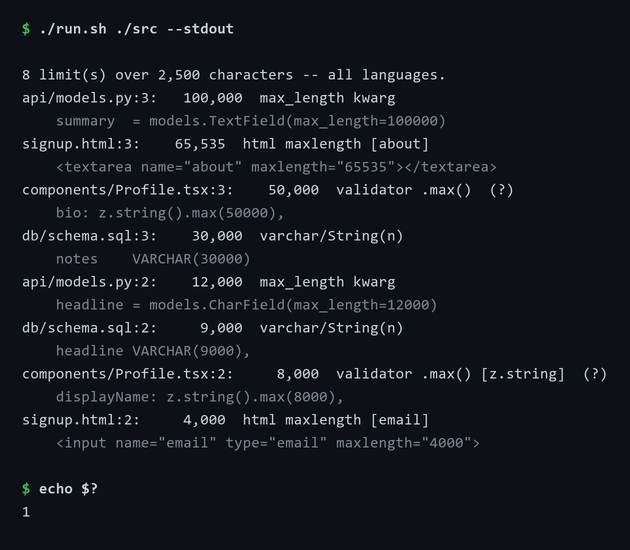
Findings are ordered largest first, so the worst offender is the line you read first. The run exits 1 because it found something — which is what makes it usable as a CI gate.
Requirements: Python 3.9+ for the Python version; Node 22.6+ for the TypeScript one. Neither has dependencies or a build step.
Choosing what to search
| Selector | Meaning |
|---|---|
| (nothing) | scan every supported language |
+py +json | scan only Python and JSON |
-py -json | scan everything except Python and JSON |
--list-groups | print every selector name and the extensions behind it |
Selectors combine — +frontend -json scans the frontend group minus JSON. An unrecognized name is treated as a literal extension, so +kt works without being a defined group.
Group names: py ts js web tpl php rb go java cs swift dart rs ex sql prisma gql json yaml toml xml, plus the umbrellas frontend, schema, and config.
One dash versus two
-json (one dash) excludes JSON files from the search. --json (two dashes) selects JSON output. They are unrelated.
Reports
A format flag writes a report into the current directory — never into the project being scanned, so an audit does not litter someone else's repo. The filename is timestamped, so consecutive scans never overwrite each other and sort chronologically:
20260811-20-05-31-oversized-limits.json| Flag | Writes |
|---|---|
--json | JSON records |
--csv | one row per finding |
--md | a Markdown table, ready to paste into an issue |
--txt | the console listing |
--out PATH | write exactly there instead; the format is inferred from the suffix. Missing folders are created |
--no-stamp | drop the timestamp — oversized-limits.<ext> |
--stdout | print the report rather than writing a file |
So +json +py --json scans only JSON and Python files and writes a timestamped .json. Paths inside every report are relative to the scanned root, so reports stay portable between machines.
Use --no-stamp or --out in CI, where the artifact path has to be predictable.
Other options
| Flag | Effect |
|---|---|
-help | show help, including the full selector list (--h, -h, --help, -? all work) |
--limit N | report limits strictly greater than N (default 2500) |
--high-only | drop ambiguous matches — see Confidence |
--include-unbounded | also flag TEXT / LONGTEXT / VARCHAR(MAX) / TextField columns |
--summary | counts by file and by rule instead of full output |
Using it in CI
Exit codes are 0 clean, 1 findings exist, 2 usage or environment error. The 0/1 split means the tool is a CI gate with no wrapper script:
yaml
- name: No input limit may exceed 2500 characters
  run: ./snippets/python/find-oversized-input-limits/run.sh . --high-only
--high-only matters here — without it the ambiguous rules will fail builds on array-length calls. Pair it with --out so the report is a predictable artifact path.
What it recognizes
Twenty-two rules, all applied to every file — there is no per-language configuration to maintain.
| Layer | Patterns |
|---|---|
| Markup | HTML maxlength, JSX maxLength={n}, Angular [maxlength]="n", Vue :maxlength, Svelte |
| Python | Django/DRF max_length=, Pydantic Field(max_length=), SQLAlchemy String(n), WTForms/marshmallow Length(max=n) |
| TypeScript/JS | class-validator @MaxLength, Validators.maxLength, TypeORM/Sequelize length:, Mongoose, Prisma @db.VarChar, Zod/Yup/Joi .max() |
| PHP | Laravel max:n rules and $table->string('col', n), Doctrine/Symfony @Assert\Length |
| Ruby | Rails length: { maximum: n }, migration limit: n |
| Go | validate:"max=n" and binding: struct tags, GORM size: / type:varchar(n) |
| Java | Bean Validation @Size(max=n), JPA @Column(length=n) |
| C# / .NET | [MaxLength], [StringLength], EF Core .HasMaxLength() |
| Schema | SQL VARCHAR(n), Prisma, JSON Schema / OpenAPI "maxLength": n, GraphQL, YAML |
Confidence
Every finding is high or medium. Medium findings print with a trailing (?), and come from patterns that are genuinely ambiguous rather than merely uncertain:
.max(n)—z.string().max(5000)is a character limit;z.array(x).max(5000)is an element count. Same syntax.length: n— a column width in TypeORM, an array size nearly everywhere else.MAX_*_LENGTHconstants — usually a character cap, occasionally a byte budget.
--high-only drops all of them. Reach for it in CI, and leave it off when auditing by hand — a medium finding is still worth a look.
Known limits
- It finds declared limits. A
<textarea>with nomaxlengthbacked by aTEXTcolumn is the unbounded case, which needs--include-unbounded— the opposite problem, and invisible to the default run. - It is line-based, so a limit split across two lines is missed.
- Vendor, build, and minified output is skipped, along with files over 2 MB and lines over 2000 characters.
Performance
A digit-count prefilter derived from --limit skips any line that cannot possibly contain a large enough number, before any of the 22 regexes run. Real repositories scan in a few seconds.