 evomedia.net
Appearance
confetti-burst
A confetti burst that falls like paper rather than sparks — air drag, tumble-driven flutter, and a numpad grid of firing positions.
Most confetti libraries throw dots along a ballistic arc. Paper does not do that: it is nearly all surface and almost no mass, so it decelerates hard, turns as it falls, and slides sideways as it turns. This models that — and the difference is the whole point of the snippet.
One file, no dependencies, no build step. Drop confetti.js into a page and call it.
The tuning panel
The snippet ships a standalone page, evo.confetti.html, that exposes every force as a slider and drives the real renderer rather than a copy of it — so the numbers you dial in are the numbers that ship.
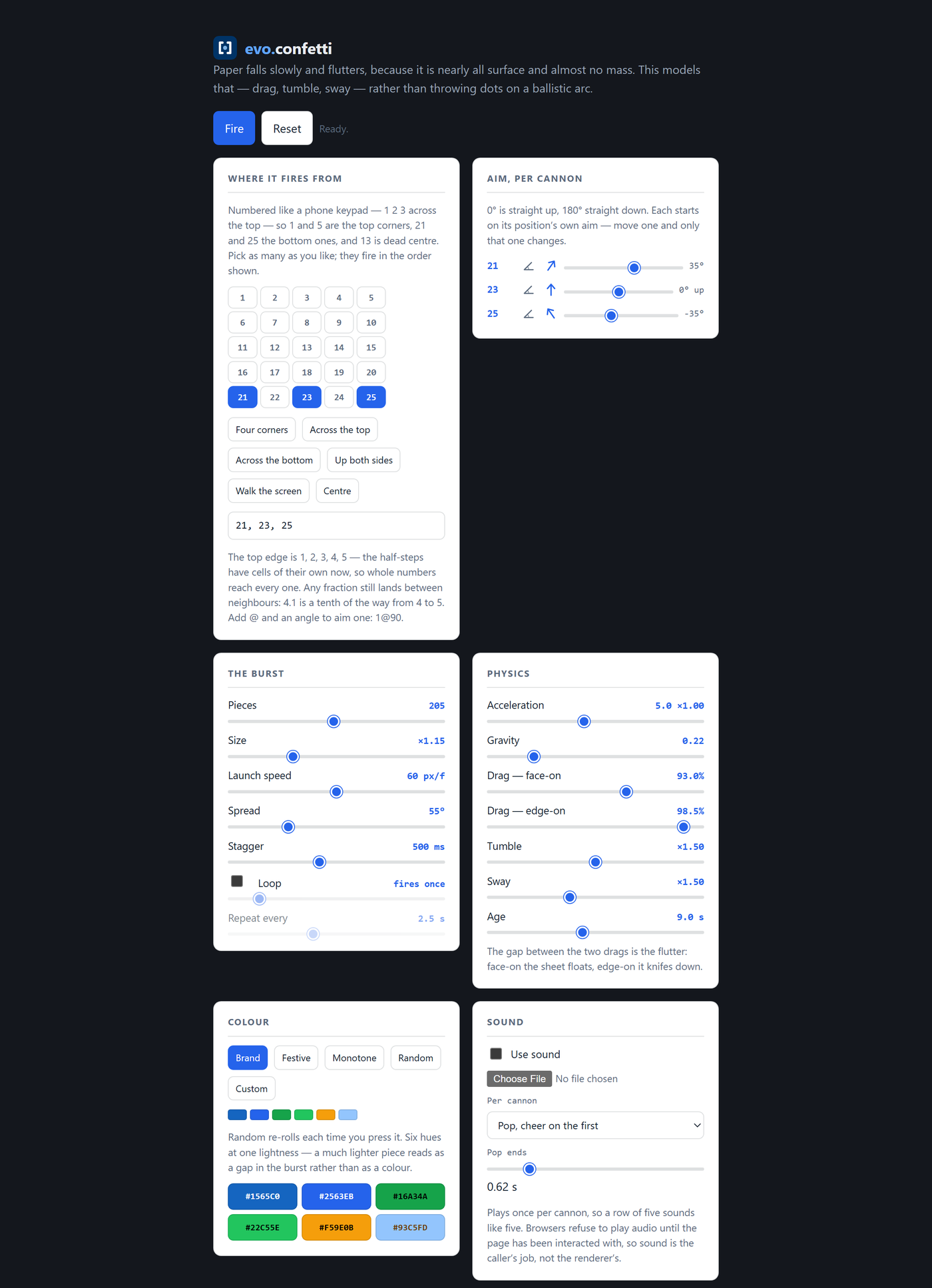
Open it by double-clicking. There is no server to run.
Run it
html
<script src="confetti.js"></script>
<script>
  confettiBurst();
</script>
That is the whole integration. Every option is optional:
js
confettiBurst({ count: 300, origin: 21, direction: 45 });Every option, with a call you can paste, is in the snippet's COMMAND.md.
Requirements: a browser. Nothing to install, nothing to serve.
Firing positions
Positions are numbered like a phone keypad — 1 bottom-left, 13 dead centre, 21 top-left, 25 top-right:
    21 22 23 24 25
    16 17 18 19 20
    11 12 13 14 15
     6  7  8  9 10
     1  2  3  4  5
Phone order rather than the calculator order a numeric keypad uses. Both are "a numpad"; only one of them is the layout people touch every day, and reading 1 2 3 at the top of a grid and having it mean the bottom of the screen is a trap the reader falls into once per sitting.
Each number carries its own aim as well as its position, because the two are not independent — a cannon in a top corner firing straight up is a cannon pointed off-screen. Pass direction and yours wins, so a pad number stays a shorthand rather than a preset.
Half-steps work: origin: 7.5 lands halfway to the next cell.
The physics
| Behaviour | How it works |
|---|---|
| Drag | Velocity is multiplied by a per-frame constant. That is not an approximation of the drag equation — it is its solution, provided the constant is e^(−k·dt). |
| Flutter | Two drag figures, not one: face-on a sheet keeps 93.0% of its velocity per frame, edge-on 98.5%. The gap between them is the flutter — face-on it floats, edge-on it knifes down. |
| Tumble | A flat sheet rotating about an in-plane axis, projected orthographically, has a visible extent of w · cos θ. Clamped so a piece never turns perfectly invisible edge-on and reads as a flicker. |
| Sway | x += A · sin(ωt + φ), applied to position rather than velocity so drag cannot damp it away — which is why the sway is still there at the bottom of the screen when everything else has slowed to a drift. |
Four of those are exact and one — the sway — is an honest first-harmonic approximation of a genuinely chaotic problem. The derivations, including the two places the renderer deliberately departs from the physics and why, are in MATH.md.
Limits
count is clamped to 1–2000, and a breach says so in the console rather than failing silently. It is the one option that can hang a page, so it is the one with hard bounds — 2000 is far above any real celebration and far below the point where the draw loop stops keeping up.
loop is clamped to 1–10 and loopDelay to a 60 ms floor, for the same reason: a runaway loop on the page you are tuning is a browser you have to kill.
What it does on its own
- Reduced motion. If the visitor has
prefers-reduced-motion: reduceset, the pieces are placed without tumble, spin or sway. The burst still happens; it simply stops moving in the ways that trigger motion sensitivity. You do not have to check for this yourself. - Idling. The animation loop stops entirely once the last piece is gone, rather than running forever at zero cost to nothing.
- No audio. The renderer never loads or plays a sound. The demo page's audio lives in its panel script, not in
confetti.js, so dropping the renderer into your page brings nothing with it.
Try it
A live version, with the same panel, runs on the main site:
- evo.confetti — the demo and tuning panel
- The maths — the derivations, rendered
- Setup steps — a step-by-step guide for someone new to HTML