 evomedia.net
Appearance
Voices
The narration is spoken by one of three providers. Which one you pick decides whether the walkthrough needs a network, whether captions are timed from the speech itself, and how reproducible the render is.
The three providers
voice.provider | Cost | Needs | Word timing |
|---|---|---|---|
edge (default) | Free | Network, no key | Yes — captions timed from the engine |
piper | Free | The piper binary and one .onnx voice model, offline | No |
silent | — | Nothing | Synthetic, sized by words per minute |
edge uses Microsoft Edge's neural voices, and voice.name picks one — en-US-GuyNeural, for example. piper runs entirely offline: set PIPER_PATH (or have piper on the PATH) and PIPER_MODEL, or pass the model path as voice.name. silent produces silence of a plausible length; it is deterministic, which is why the test suite uses it.
No provider falls back to another on its own. A silent video where a voice was asked for is a wrong-looking success — it renders, it plays, and nobody notices until someone watches it with the sound up. So a failed voice fails the step with a message naming the alternatives instead. The edge endpoint is unofficial, so before trusting a release:
bash
npm run check:edgeChoosing one
The edge provider offers 322 voices, 47 of them English and split almost evenly between male and female. List them rather than guessing a name:
bash
npm run voices                 # English voices, male and female
npm run voices -- en-GB        # one locale
npm run voices -- en-US female # locale and gender
npm run voices -- all          # every locale the service offers
Each row gives the id to use as voice.name, the gender, and the character Microsoft assigns it — Friendly, Positive, Cheerful, Clear, and so on.
Or hear them
Picking a voice from a list is still guessing, so there is a picker:
powershell
cd server
npm run docs:serve      # then open http://127.0.0.1:8099/voices.html
bash
cd server && npm run docs:serve # then open http://127.0.0.1:8099/voices.html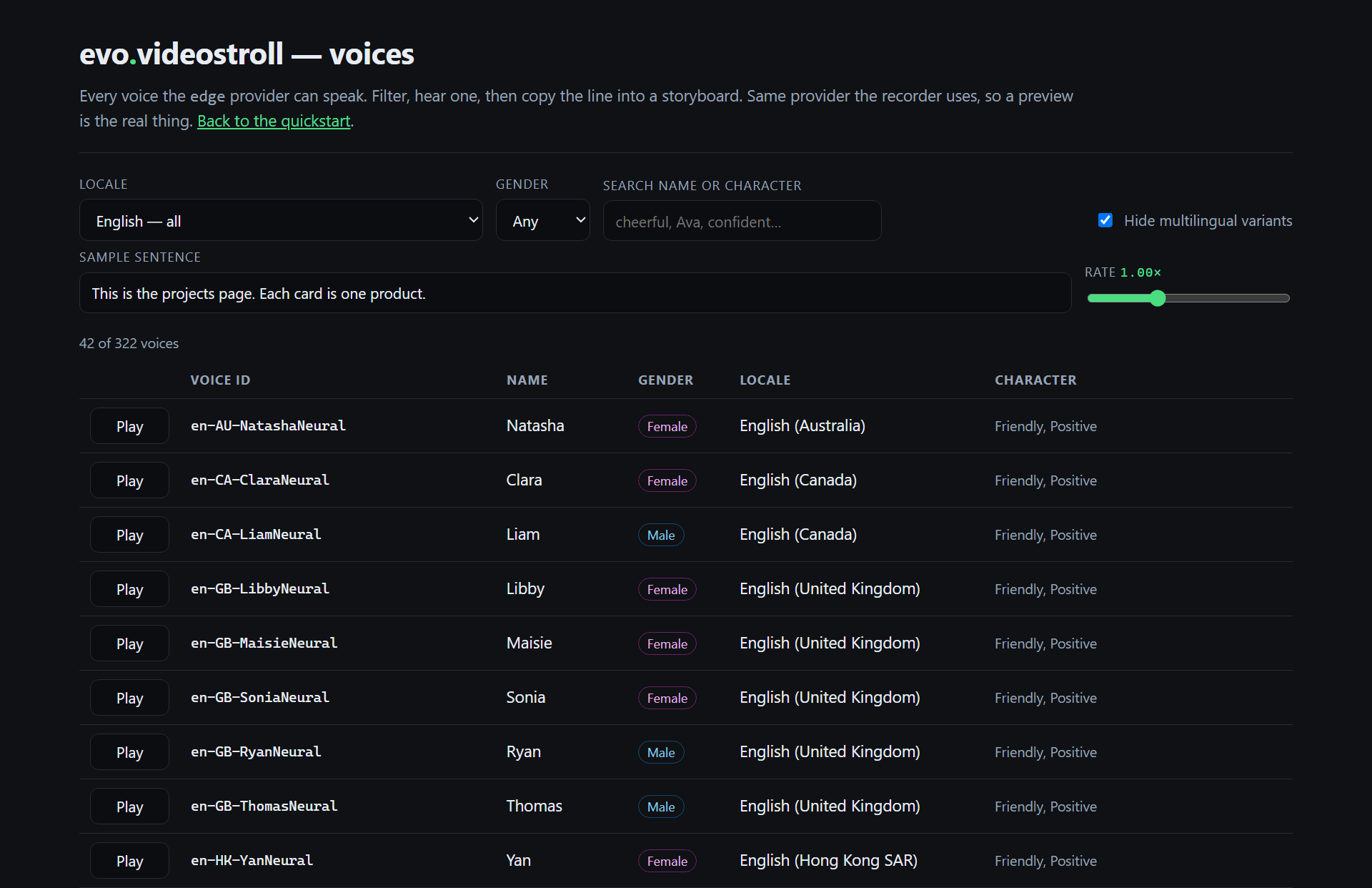
Filter by locale, gender or character, type the sentence you actually intend to use, play it at the rate you intend to use, and copy the finished "voice": { … } line straight into a storyboard. Previews go through the same provider the recorder does, so what you hear is what gets recorded.
The catalogue is a live call, so the page needs the network. It binds to localhost only, and the preview endpoint validates what it is asked to say — including refusing to speak anything credential-shaped.
More than one voice in a walkthrough
A step may name its own voice. Anything it does not name it inherits from the storyboard's, and the override lasts exactly one step:
json
{
  "voice": { "provider": "edge", "name": "en-US-GuyNeural" },
  "steps": [
    { "narration": "The default narrator." },
    { "narration": "A different speaker, same provider and rate.",
      "voice": { "name": "en-US-AvaNeural" } },
    { "narration": "A little quicker, same voice.", "voice": { "rate": 1.15 } },
    { "narration": "Back to the default." }
  ]
}
videostroll_step takes the same voice field, so an agent can hand off between narrators mid-walkthrough.
One rule is not plain merging: naming a different provider without a name does not carry the old provider's voice name across, because a name belongs to the provider that defines it. en-US-GuyNeural means nothing to piper, and silently keeping it would produce either a crash or the wrong voice.