 evomedia.net
Appearance
System flows
Three sequence diagrams showing how requests move through EvoPlatform — how a sign-up becomes a workspace, how a tenant site serves a signed-in user, and how an app built on the platform consumes Ask AI.
Reading the arrows — time runs top to bottom, and every arrow points the way the call travels: the tail is always the initiator.
| Mark | Meaning |
|---|---|
| Solid arrow | A request, pointing from the initiator to the receiver. Whoever is at the tail made the call. |
| Dashed arrow | A response, returning to whoever asked. Responses never initiate anything. |
| Amber arrow | An out-of-band push — a verification email, a Stripe webhook. It arrives on its own schedule, not as a reply to the flow above it. |
| Blue arrow / box | The mechanism the figure exists to show. |
1 · User sign-up, end to end
Self-service signup arrives through an app, never at the platform directly. One request creates the workspace, its founding admin, and trial access to exactly the app the person arrived through — and nobody can sign in until the mailbox is proven.
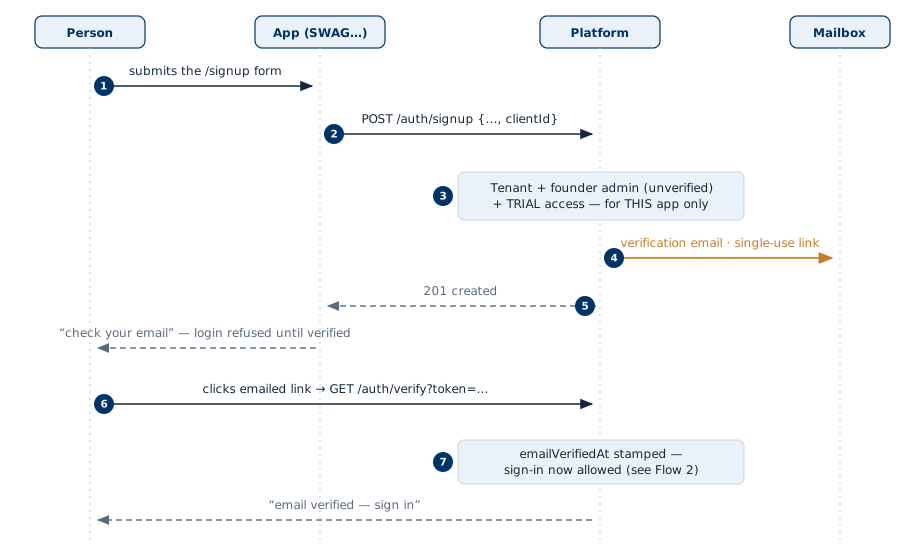
- The person fills the app's signup form. The app's server — never the browser — talks to the platform.
- One call:
POST /auth/signup, carrying the app'sclientId. Gated bySIGNUP_MODE(closed by default); the password is checked against the NIST/OWASP Standard here, at set time. - The platform creates the workspace, the founding user as tenant admin, and a 14-day
TRIALaccess row for the arriving app only — other apps stay denied by default. - A single-use verification link is mailed.
- Until the link is clicked, any login attempt is refused with Email not verified.
- Clicking the link is a new inbound request from the person — direction reverses; nothing was pushed to their browser.
- The mailbox is proven; sign-in proceeds exactly as in the next flow.
Direction rules: every solid arrow is user- or app-initiated, left to right toward the platform. The platform initiates exactly one thing — the email — and it never calls the app or the browser.
2 · A tenant site through the system
The everyday path: browser → edge → app, with login delegated to the platform and everything after verified locally. The blue steps are the design's point — after login, the app does not need the platform to be up.
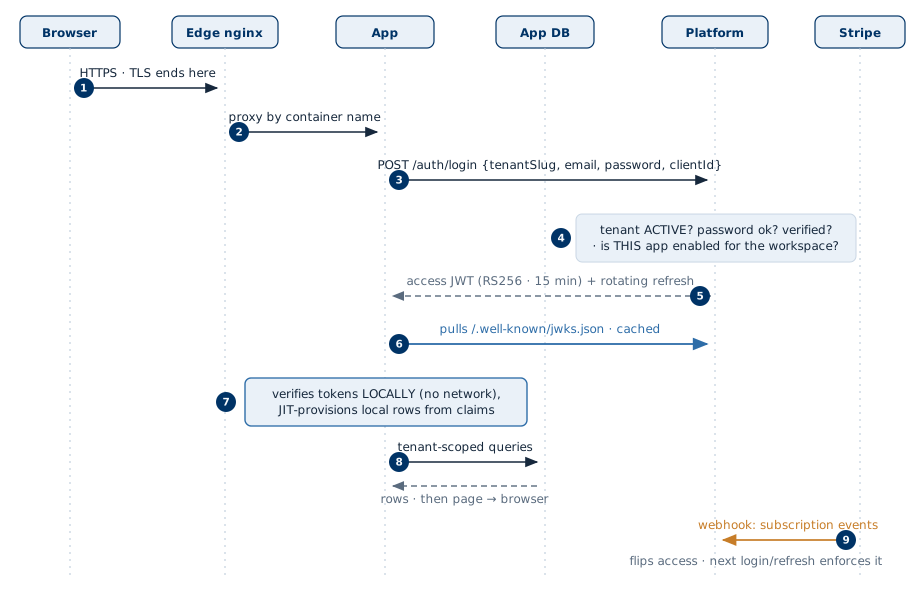
- TLS terminates at the edge proxy; apps are never exposed on public ports.
- The edge reaches the app over an internal network.
- The app delegates credentials to the platform — it stores no passwords of its own in platform mode.
- Four gates in order: workspace status, credentials, verified mailbox, and per-app enablement (
TRIALuntil its date,ACTIVE, orPAST_DUEwithin grace). No enablement row = refused. - Short-lived access token (RS256, 15 minutes) plus rotating refresh token return to the app.
- Pull, not push: the app fetches the platform's public keys once and caches them. The platform never calls into an app.
- Every later request is verified by signature locally; local tenant/user rows are provisioned just-in-time from the verified claims.
- Business data lives in the app's own database, always tenant-scoped — the platform holds identity and billing, never app data.
- Stripe events arrive at the platform on their own schedule and flip the enablement row; the change bites at the next login or token refresh, not mid-request.
Direction rules: the browser initiates everything on the left; the app initiates toward the platform and its own DB; the only arrows pointing into the platform uninvited are Stripe's webhooks — and nothing, ever, calls into the browser.
3 · A tenant app asking evo-ai
How an app built on the platform consumes Ask AI: the app's server proxies the question with a service key, retrieval is strictly tenant-scoped, and the relevance gate can refuse before any model is paid for. evo-ai is a separate service, consumed through the SDK's optional AskAi client.
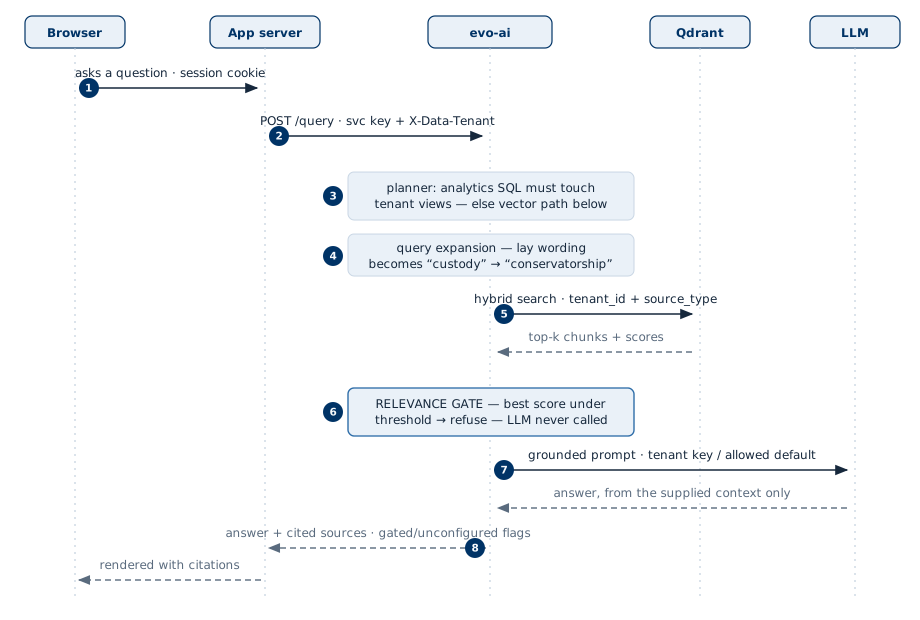
- The tenant is taken from the signed-in session — a caller can't name someone else's workspace.
- The app's server holds one service key and asserts the tenant per request via
X-Data-Tenant. Platform-mode apps may instead pass the user's JWT through — evo-ai then reads the tenant from verified claims. - A question routed to analytics SQL must reference the tenant's own views — otherwise it drops to the vector path, where the gate decides.
- Lay phrasing is expanded to the corpus's own vocabulary before searching; the model never sees the rewrite — retrieval only.
- Hybrid search inside the tenant's own collection, filtered by tenant and source type — isolation by construction.
- The relevance gate refuses off-topic questions before any model is invoked: a refusal costs nothing and can't hallucinate.
- The model answers only from the supplied context, billed to the tenant's own key when one is configured.
- The answer travels back with its cited sources and explicit
gated/unconfiguredflags, so the app renders refusals as designed states, not errors.
Direction rules: initiation flows strictly left to right — browser → app → evo-ai → stores/model — and only responses come back. evo-ai never calls the app; the app never exposes the key; the browser never talks to evo-ai at all.